ChatMate - AI Chatbot Dashboard V1: Your Command Center
In the fast-paced world of digital customer interaction, the interface is everything. You can have the most advanced machine learning backend, but if the user interface is clunky or uninspired, the experience falls flat. This is where ChatMate - AI Chatbot Dashboard V1 steps in, bridging the gap between raw data and actionable user experience. It isn’t just a collection of screens; it is a comprehensive design system built for the modern conversational AI landscape. Whether you are a developer looking to streamline your workflow or a product designer seeking a polished starting point, this dashboard offers a foundation that feels both professional and intuitive.
Visual Character and Design Philosophy
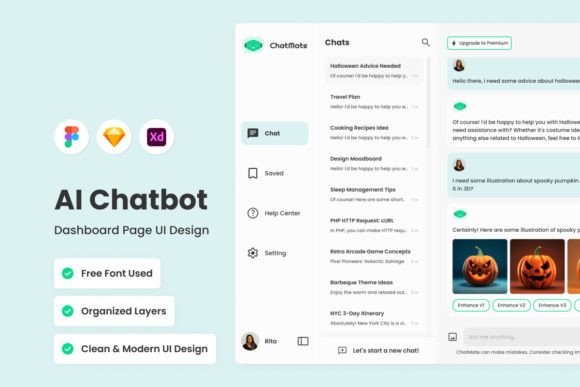
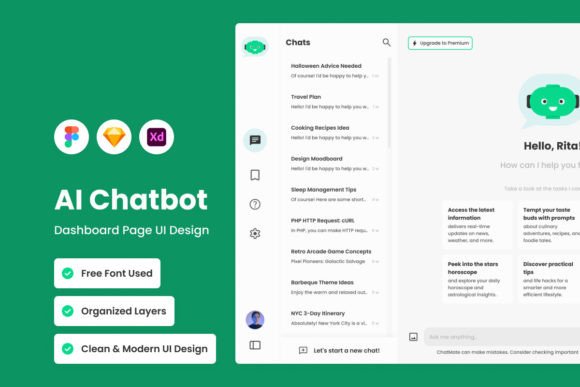
When you first open the file, the personality of ChatMate V1 is immediately apparent. It strikes a careful balance between high-tech utility and approachable design. The visual style leans heavily into modern typography and clean aesthetics, avoiding the cluttered, "data-dump" look that plagues many older enterprise tools. Instead, it utilizes negative space effectively, guiding the eye to key performance indicators and conversation logs without overwhelming the user.
The design system relies on a well-thought-out color palette that feels corporate yet fresh. It uses contrast to establish a clear visual hierarchy, ensuring that primary actions—like responding to a user or checking a metric—are instantly recognizable. This isn't just about looking good; it’s about functional psychology. The rounded corners of the cards and the consistent iconography give the interface a friendly "personality," which is crucial for a tool centered around conversation. It feels less like a piece of software and more like a collaborative partner.
Engineering a Seamless User Experience
One of the standout features of ChatMate - AI Chatbot Dashboard V1 is its structural integrity. For designers and developers, the "engine under the hood" matters just as much as the paint job. The layers are meticulously organized and labeled, which is a massive time-saver when you need to adjust the design assets to fit a specific brand identity. You aren't digging through a chaotic mess of groups; the structure is logical, making the design easy to adjust and customize.
Furthermore, the dashboard embraces versatility through its technical specifications. It utilizes open-source fonts, meaning you won't run into licensing headaches during the prototyping phase. The inclusion of global text and color styles allows for rapid rebranding. If your client has a specific corporate blue, you can swap it out across the entire desktop and mobile versions in minutes. This attention to detail shows an understanding of real-world workflow. It’s compatible with the industry's heavy hitters—Figma, Sketch, and Adobe XD—ensuring that no matter your preferred ecosystem, ChatMate fits right in.
Strategic Applications for Business Growth
While this is a design asset, its value extends far beyond the screen. For entrepreneurs and small business owners, adopting a tool like ChatMate - AI Chatbot Dashboard V1 is a strategic move toward professionalizing operations. A polished dashboard interface influences how your team perceives the tool. When the software looks professional and functions smoothly, it encourages adoption and consistent use. This leads to better data collection and, ultimately, better customer service.
Consider the impact on brand perception. If you are a SaaS company or a digital agency, the chatbot interface is often the first point of contact for your users. Using the patterns and layouts found in ChatMate V1 can inspire your own web design and digital product strategy. It demonstrates how to handle complex information—like user feedback and engagement metrics—in a way that feels digestible. It’s a masterclass in editorial design applied to a functional dashboard, proving that utility and beauty can coexist.
Practical Implementation and Optimization
To get the most out of this resource, you need to treat it as a living document rather than a static image. Start by evaluating the font pairings used in the preview. While the file includes open-source fonts, you might want to swap them for a premium font or a specific serif font to match your corporate guidelines. Pay attention to the readability of the body text; dashboards are read frequently, so ensuring your chosen sans serif font renders well at smaller sizes is critical for accessibility.
Next, look at the mobile version. In today's market, responsive design is non-negotiable. ChatMate V1 provides a mobile layout that strips away the excess, focusing on the core conversation flow. This is a great opportunity to test how your content scales. Does the hierarchy hold up on a smaller screen? Do the buttons remain easy to tap? Use the organized layers to hide elements that might clutter the mobile view, optimizing the experience for users on the go.
Finally, remember that the images used in the preview are for demonstration purposes. This is actually a benefit, as it forces you to populate the dashboard with your own relevant content immediately. Fill the chat logs with your actual use cases and the metrics with your real data. By doing so, you transform ChatMate - AI Chatbot Dashboard V1 from a generic template into a powerful tool that drives engagement and helps you master the art of conversational AI.